CnIndexSidebar
Schema-driven right sidebar with tabs for search, faceted filters, and column visibility. Typically used alongside CnIndexPage.
Wraps: NcAppSidebar, NcAppSidebarTab, NcTextField, NcSelect, NcCheckboxRadioSwitch, NcPopover. See NcAppSidebar for the underlying primitive.
Try it
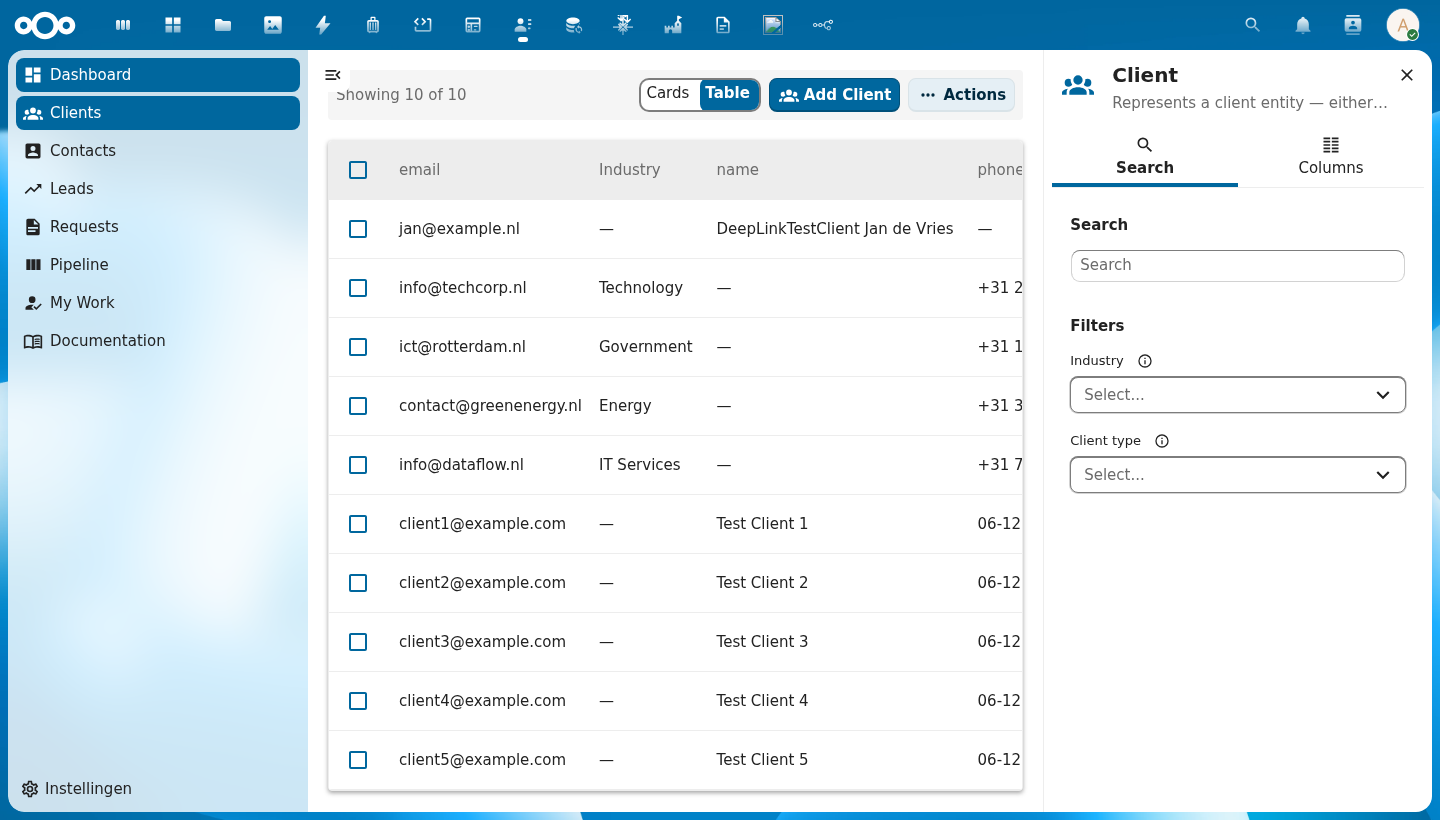
Anatomy
+-------------------------------+
|  [icon]  Entity Title    [×]  |  ← header: schema icon + title + close button
+-------------------------------+
|  [🔍 Search]  [▦ Columns]    |  ← tab bar
+-------------------------------+
|                               |
|  Search                       |
|  [ Type to search...      ]   |  ← full-text search input
|                               |
|  Filters                      |
|  Field A  ⓘ  [Select...  ▾]  |  ← auto-generated from schema.properties
|  Field B  ⓘ  [Select...  ▾]  |    only properties with enum/facetable shown
|                               |
+-------------------------------+

  ── Columns tab ──────────────
|  Column Visibility            |
|  Select which columns to show |
|                               |
|  Properties                   |
|  ☑ name   ☑ email   ☐ phone  |  ← toggle checkboxes
|                               |
|  Metadata                     |
|  ☑ created  ☐ updated        |
+-------------------------------+
| Region | Description |
|---|---|
| Header | Schema icon (via CnIcon), entity title, and a close button that emits update:open |
| Search tab | Full-text search input and faceted filter dropdowns auto-generated from the schema |
| Columns tab | Checkboxes to toggle each column's visibility; grouped by property group and Metadata |
| Filter controls | One control per filterable schema property; shows live counts when facetData is provided |
Usage
<CnIndexSidebar
  :schema="schema"
  :search-value="search"
  :active-filters="filters"
  :facet-data="facets"
  :visible-columns="columns"
  @search="onSearch"
  @filter-change="onFilterChange"
  @columns-change="onColumnsChange" />
When using CnIndexPage, the sidebar is managed internally — you do not need to wire it up separately.
Props
| Prop | Type | Default | Description |
|---|---|---|---|
schema | Object | null | Schema object — drives auto-generated filters (from properties) and the column list |
title | String | '' | Sidebar header title; defaults to schema.title when empty |
subtitle | String | '' | The line under the title, in place of schema.description: CnIndexPage hands it the page's sidebar.subtitle with {total} and {shown} filled ("48 zaken, 8 op deze pagina", DqFilterBeheren) |
icon | String | '' | MDI icon name or emoji shown in the header; defaults to schema.icon |
open | Boolean | true | Controls sidebar open/closed state (use with v-model:open) |
searchValue | String | '' | Current search term (controlled); bind to your store's search state |
searchPlaceholder | String | 'Type to search...' | Placeholder text inside the search input |
activeFilters | Object | {} | Currently active filter values: { fieldName: [selectedValues] } |
facetData | Object | {} | Live facet counts from the backend: { fieldName: { values: [{ value, count }] } } — shows counts next to each filter option |
visibleColumns | Array | null | Array of column keys currently shown in the table; controls the Columns tab checkboxes |
personalColumns | Boolean | true | Show the Order and pin list and Reset columns in the Columns tab. |
pinnedCount | Number | 0 | How many of the first visible columns are pinned to the start of the table. |
sortOptions | Array | [] | The orders the Sort section in the Search tab offers: [{ value, label, keys }], keys a [{ key, order }] list read as its ascending form. Empty draws no Sort section. Choosing a field or a direction emits sort-change with the new [{ key, order }]. |
currentSort | Array | [] | The list's current order, [{ key, order }]: the Sort section shows its field, its direction and "Current order: ...". |
currentSortValue | String | '' | The Sort option chosen by its value, for an order that is not a list of sort keys: an option with fixed: true, such as one whose rows an endpoint ranks (sortSelectOptions[].source). Wins over matching currentSort. |
columnGroups | Array | [] | Additional custom column groups to add to the Columns tab |
showMetadata | Boolean | true | When true, includes a built-in "Metadata" group with created, updated, uuid columns |
propertiesGroupLabel | String | '' | Override the label for the auto-generated properties column group |
defaultTab | String | 'search-tab' | ID of the tab that is active when the sidebar opens. Built-in values: 'search-tab', 'columns-tab'. Use your custom tab's id for custom tabs |
searchTabLabel | String | 'Search' | Label for the Search tab button |
columnsTabLabel | String | 'Columns' | Label for the Columns tab button |
searchLabel | String | 'Search' | Heading inside the Search tab |
filtersLabel | String | 'Filters' | Heading above the filter controls |
clearAllLabel | String | 'Clear all' | Label for the "Clear all" button, shown when a search term or any filter is active. Clicking it emits clear-filters. |
fromLabel | String | 'From' | Start-of-window label on a date-range filter |
toLabel | String | 'To' | End-of-window label on a date-range filter |
filterFields | Object | null | Filter declarations for a page with no schema of its own. Wins over schema, and feeds the Search tab only |
columnsHeading | String | 'Column Visibility' | Heading inside the Columns tab |
columnsDescription | String | 'Select which columns to display in the table' | Subtitle inside the Columns tab |
activeTab | String | '' | Switch to a tab while the sidebar is mounted, e.g. 'filters-tab'. Empty leaves the tab alone. |
savedViews | Object | null | The page's saved views, shown in a third tab, Filters, by CnSavedViewsPanel: { views, loading, currentUserId, counts, selectedViewId, maxDepth, menuIds }. null shows none. |
userIsAdmin | Boolean | true | Whether the current user is an admin. When false, schema properties with adminOnly: true are hidden from the filter list in the Search tab. |
Events
| Event | Payload | Description |
|---|---|---|
search | searchTerm | Emitted when the search input changes |
filter-change | { key, values } | Emitted when a filter selection changes; values is the updated array of selected values for that key |
columns-change | visibleKeys[] | Emitted when the user toggles a column; payload is the full updated array of visible column keys |
columns-reorder | visibleKeys[] | The user moved or pinned a column; payload is the visible column keys in their new order |
pin-change | count | The user pinned or unpinned a column; payload is the new number of pinned columns |
columns-reset | none | The user chose Reset columns |
update:open | isOpen | Emitted when the close button is clicked; use with v-model:open |
saved-view | { action, view } | A saved-view intent from the Filters tab: apply, save, edit, share, presentation, update, copy, menu or delete. |
tab-change | tabId | Emitted when the user switches tabs; payload is the new tab's id string |
clear-filters | — | Emitted when "Clear all" is clicked; the host resets the search term and every active filter |
Slots
| Slot | Description |
|---|---|
#search-above | Content rendered above the search field in the Search tab (e.g. hints, quick actions). Only the section is rendered when the slot has content. |
#search-extra | Content rendered at the bottom of the Search tab, below the search field and filters |
#columns-extra | Additional content rendered at the bottom of the Columns tab |
#tabs | Inject one or more additional NcAppSidebarTab components after the built-in Search and Columns tabs |
Order and pin the columns
The Columns tab opens with an Order and pin list of the visible columns. Each row has a drag handle, Move up, Move down and Pin. The drag and the buttons call the same method (moveColumn), so the keyboard path and the mouse path cannot disagree. The buttons are labelled with the column ("Move Supplier up"); Pin is a toggle with aria-pressed. A pinned column moves into the pinned block at the start, and a column stays inside its block (pinned columns move among the pinned). The table header is not a drag target. Reset columns returns the list to the page's own columns.
The sidebar only reports: columns-reorder carries the visible keys in their new order, pin-change the number pinned, and columns-reset the reset. CnIndexPage keeps the layout per user and per list (see its personalColumns prop) and applies this precedence: a saved view that carries columns while it is applied, then the person's own layout, then the page's config.columns. A column the schema no longer has drops out of a stored layout silently, and a new schema column appears hidden at the end. Pinned columns are made sticky by CnDataTable's pinnedCount.
Icon Resolution
The sidebar header displays an icon from the icon prop (or schema.icon). Icons are resolved via the CnIcon registry — make sure your app has called registerIcons() with the required icon components before using this sidebar.
Reference (auto-generated)
The tables below are generated from the SFC source via vue-docgen-cli. They reflect what's actually in CnIndexSidebar.vue and update automatically whenever the component changes.
OpenRegister reliance
medium: this component relies on OpenRegister for part of what it does. 1 direct reference, 3 files reached through imports.
See the reliance overview for the filterable list.
Props
| Name | Type | Required | Default | Description |
|---|---|---|---|---|
subtitle | string | '' | The line under the title, in place of the schema's description: the page's count ("48 zaken, 8 op deze pagina", DqFilterBeheren). | |
title | string | '' | Sidebar title. Defaults to schema.title when not set. | |
icon | string | '' | MDI icon name or emoji. Defaults to schema.icon when not set. | |
schema | object | null | Schema object for auto-generating filters, columns, and labels | |
visibleColumns | array | null | Array of currently visible column keys | |
personalColumns | boolean | true | Show the Order and pin controls in the Columns tab, and Reset columns. Off keeps show and hide only. | |
pinnedCount | number | 0 | How many of the first visible columns are pinned to the start of the table. | |
sortOptions | array | [] | The orders the Sort section offers, [{ value, label, keys, fixed? }], each keys a [{ key, order }] list read as its ascending form. An option with fixed: true is an order of its own (the rows an endpoint ranks): it is chosen by its value, has no direction, and its keys are not matched against the current order. Empty draws no Sort section (the table view sorts by its headers). | |
currentSort | array | [] | The list's current order, [{ key, order }]. | |
currentSortValue | string | '' | The Sort option chosen by its value, for an order that is not a list of sort keys (an option with fixed: true, such as one whose rows an endpoint ranks). Wins over matching currentSort. | |
searchValue | string | '' | Current search term | |
open | boolean | true | Whether sidebar is open | |
activeFilters | object | \{\} | Current active facet filters: { fieldName: [values] } | |
facetData | object | \{\} | Live facet data from the API: { fieldName: { values: [{ value, count?, label? }] } } | |
columnGroups | array | [] | Additional column groups beyond schema properties and the built-in Metadata. Each group: { id: string, label: string, columns: Array<{key, label}>, expanded?: boolean } | |
showMetadata | boolean | true | Whether to include the built-in Metadata column group | |
searchPlaceholder | string | () => t('nextcloud-vue', 'Type to search…') | Search input placeholder | |
searchTabLabel | string | () => t('nextcloud-vue', 'Search') | Search tab label | |
columnsTabLabel | string | () => t('nextcloud-vue', 'Columns') | Columns tab label | |
searchLabel | string | () => t('nextcloud-vue', 'Search') | Search section heading | |
filtersLabel | string | () => t('nextcloud-vue', 'Filters') | Filters section heading | |
clearAllLabel | string | () => t('nextcloud-vue', 'Clear all') | "Clear all" button label, shown when search or a filter is active | |
filterFields | union | null | Filter declarations for a page with no schema of its own: { name: declaration }, the same shape a schema property has. Wins over schema, and feeds the Search tab only. 🔑 A FILTER IS NOT A COLUMN, which is the whole reason this is its own prop rather than a synthetic schema. The schema feeds BOTH tabs, so a page that declared its filters there would also offer them in the Columns tab: the toggle would tick and no column would appear, because the table's columns come from somewhere else entirely. These reach the Search tab and nothing else. | |
fromLabel | string | () => t('nextcloud-vue', 'From') | Start-of-window label on a date-range filter. | |
toLabel | string | () => t('nextcloud-vue', 'To') | End-of-window label on a date-range filter. | |
columnsHeading | string | () => t('nextcloud-vue', 'Column visibility') | Columns section heading | |
columnsDescription | string | () => t('nextcloud-vue', 'Select which columns to display in the table') | Columns section description | |
propertiesGroupLabel | string | '' | Override label for the schema properties group. Defaults to schema.title. | |
defaultTab | string | 'search-tab' | ID of the tab that should be active when the sidebar opens. Built-in IDs are 'search-tab' and 'columns-tab'. Use the id you set on your custom NcAppSidebarTab for custom tabs. | |
activeTab | string | '' | Switch to a tab while the sidebar is mounted, e.g. 'filters-tab' after a view was saved from the toolbar. Empty leaves the tab alone. | |
savedViews | object | null | The page's saved views, shown in the Filters tab: { views, loading, currentUserId, counts, selectedViewId, maxDepth, menuIds } as CnSavedViewsPanel takes them. null shows no saved views. Every intent comes back as one saved-view event. | |
userIsAdmin | boolean | true | Whether the current user is an admin. When false, schema properties with adminOnly: true are hidden from filters. |
Events
| Name | Payload | Description |
|---|---|---|
update:open | — | |
search | — | |
columns-reset | — | |
clear-filters | — | "Clear all" clicked; reset search and every active filter. |
columns-change | — | |
columns-reorder | — | Emitted when the user moves a column. Payload: the visible column keys in their new order. |
pin-change | — | Emitted when a column is pinned or unpinned. Payload: the new number of pinned columns. |
filter-change | — | |
saved-view | — | A saved-view intent from the Filters tab. Payload: { action, view }. |
sort-change | undefined | The Sort section chose an order. Payload: [{ key, order }], and the chosen option's value, which names an order that is not keys (fixed). |
tab-change | — |
Slots
| Name | Bindings | Description |
|---|---|---|
search-above | — | |
search-extra | — | |
columns-extra | — | |
tabs | — |