CnMassExportDialog
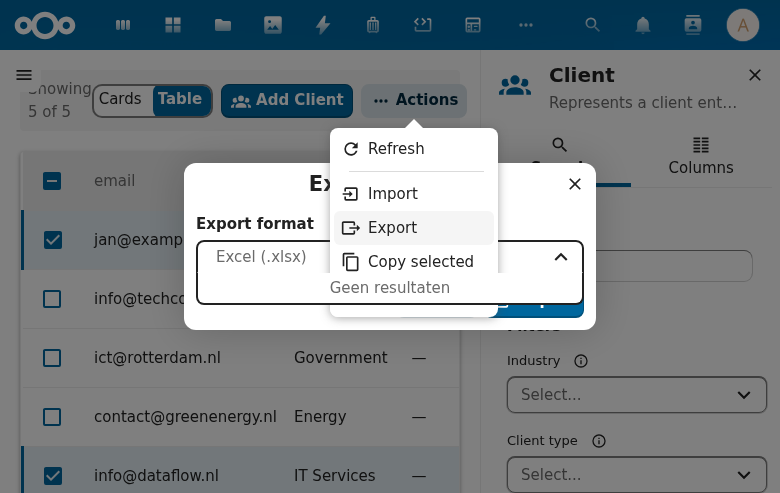
Export format selection dialog. Lets users pick a format and triggers export for selected items.
Try it
Loading CnMassExportDialog playground…
Wraps: NcDialog, NcButton, NcSelect
Props
| Prop | Type | Default | Description |
|---|---|---|---|
dialogTitle | String | 'Export objects' | |
description | String | '' | Optional description text shown above the format selector |
formats | Array | [{ id: 'excel', label: 'Excel (.xlsx)' }, { id: 'csv', label: 'CSV (.csv)' }] | Available export formats as [{ id, label }] objects |
defaultFormat | String | 'excel' | ID of the format selected by default |
entities | Array | [] | Optional selectable entity types ([{ id, label }]) rendered as an extra picker above the format selector — the export-launcher case ("which dataset am I exporting?"). Empty hides the picker (pre-existing format-only dialog). Used by the manifest type: "export" action (see dispatch-action). |
defaultEntity | String | '' | ID of the entity selected by default (first entity when unset) |
entityLabel | String | 'Entity' | Label above the entity selector |
successText | String | 'Export completed successfully.' | Message shown in the result phase on success |
formatLabel | String | 'Export format' | Label above the format selector |
cancelLabel | String | 'Cancel' | |
closeLabel | String | 'Close' | Label for the close button shown in the result phase |
confirmLabel | String | 'Export' |
Events
| Event | Payload | Description |
|---|---|---|
confirm | \{ format, entity? \} | Export confirmed — entity is present only when the entities picker is configured |
close | — | Dialog closed |
Public Methods
| Method | Description |
|---|---|
setResult(\{ success?, error?, data? \}) | Set export result |
Live demo
<template>
  <div>
    <button @click="open = true" style="padding: 6px 16px; border-radius: 4px; background: var(--color-primary-element); color: white; border: none; cursor: pointer;">Export</button>
    <CnMassExportDialog
      v-if="open"
      ref="dlg"
      @confirm="onConfirm"
      @close="open = false" />
  </div>
</template>
<script>
export default {
  data() { return { open: false } },
  methods: {
    async onConfirm(payload) {
      await new Promise(r => setTimeout(r, 800))
      this.$refs.dlg.setResult({ success: true })
    },
  },
}
</script>
Usage
<CnMassExportDialog
  :items="selectedItems"
  :formats="['json', 'csv', 'xlsx']"
  @confirm="onExport"
  @close="showExport = false" />
Reference (auto-generated)
The tables below are generated from the SFC source via vue-docgen-cli. They reflect what's actually in CnMassExportDialog.vue and update automatically whenever the component changes.
Props
| Name | Type | Required | Default | Description |
|---|---|---|---|---|
dialogTitle | string | () => t('nextcloud-vue', 'Export objects') | Dialog title | |
description | string | '' | Description text shown above the format selector | |
formats | array | [ \{ id: 'excel', label: 'Excel (.xlsx)' \}, \{ id: 'csv', label: 'CSV (.csv)' \}, ] | Available export formats | |
defaultFormat | string | 'excel' | Default selected format ID | |
entities | Array<{id: string, label: string}> | [] | Optional selectable entity types ([{ id, label }]) rendered as an extra picker above the format selector — the export-launcher case ("which dataset am I exporting?"). Empty (the default) hides the picker and keeps the pre-existing format-only dialog. When set, the confirm payload carries the chosen entity id. | |
defaultEntity | string | '' | Optional default selected entity ID (first entity when unset). | |
entityLabel | string | () => t('nextcloud-vue', 'Entity') | Label for the entity selector. | |
successText | string | () => t('nextcloud-vue', 'Export completed successfully.') | Success message | |
formatLabel | string | () => t('nextcloud-vue', 'Export format') | Label for the export format selector | |
cancelLabel | string | () => t('nextcloud-vue', 'Cancel') | Label for the cancel button | |
closeLabel | string | () => t('nextcloud-vue', 'Close') | Label for the close button | |
confirmLabel | string | () => t('nextcloud-vue', 'Export') | Label for the confirm / primary action button |
Events
| Name | Payload | Description |
|---|---|---|
close | — | |
confirm | — | Emitted when the primary Export button is clicked. |
Methods
| Name | Description |
|---|---|
setResult | Set the result of the export operation. |