CnRegisterMapping
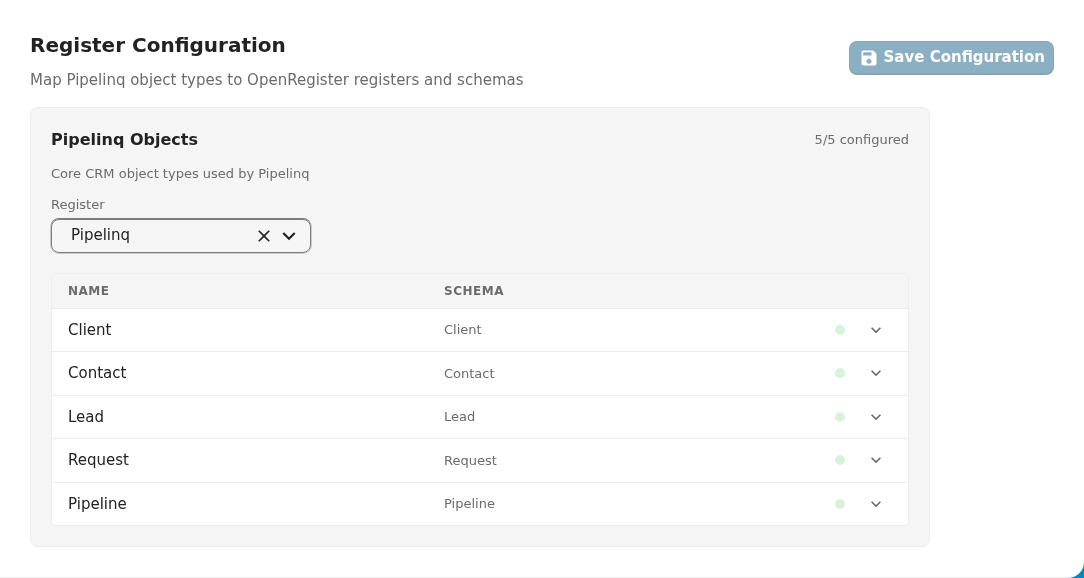
OpenRegister register/schema configuration panel. Lets admin users map app object types to OpenRegister registers and schemas. Groups related object types together, shows a register dropdown (with auto-schema-matching), and a save/reimport action area.
Wraps: NcSelect, NcNoteCard, NcButton, NcLoadingIcon (via CnSettingsSection)
Try it
Props
| Prop | Type | Default | Description |
|---|---|---|---|
groups | Array | (required) | Groups of object types that share a register. Each group: { name, description?, registerConfigKey?, types: [{ slug, label, description?, configKey? }] } |
name | String | 'Register configuration' | Section title |
description | String | 'Configure OpenRegister schema mappings for your object types' | Section description |
docUrl | String | '' | Documentation URL — shows an info icon next to the title |
configuration | Object | {} | Current configuration values keyed by config key: { register: '5', client_schema: '28', ... } |
showSaveButton | Boolean | true | Whether to show the Save button |
saving | Boolean | false | Whether a save is in progress |
showReimportButton | Boolean | false | Whether to show the Re-import button |
reimporting | Boolean | false | Whether a reimport is in progress |
saveButtonText | String | 'Save configuration' | Save button label |
reimportButtonText | String | 'Re-import configuration' | Re-import button label |
collapseGroups | Boolean | null | Each group is a heading button that opens and closes it, with its configured count shown while closed; the groups start closed. null does this when there is more than one group; true or false forces it. |
look | String | '' | board or nextcloud; empty follows the provided cnLook. The board look draws one open group as a type/schema table and the others as rows with a status chip, and saves at the end of the section |
boardRowLimit | Number | 4 | Board look: how many types the open group lists before the "show all" line; 0 lists every type |
boardLayout | String | 'table' | Board look: table draws the open group's type and schema table with the other groups as rows (PqBeheer); selects draws, per group, the register select and a schema select per type in a grid of three, one column on a narrow screen (DqBeheerinstellingen) |
autoMatch | Boolean | true | When a register is selected, automatically match schema titles to object type slugs |
labels | Object | { register, schema, configured, notConfigured, noSchemas, selectRegister, selectSchema, allConfigured, partiallyConfigured } | Override UI strings (all default to translated English) |
Events
| Event | Payload | Description |
|---|---|---|
update:configuration | configuration | Emitted when any register or schema selection changes (use with .sync or v-model) |
save | — | Save button clicked |
reimport | — | Re-import button clicked |
Slots
| Slot | Description |
|---|---|
#actions | Extra action buttons rendered alongside Save/Re-import |
#group-header | Custom header content for each group (scoped: { group }) |
#footer | Footer content below the configuration section |
Usage
<CnRegisterMapping
  :groups="[
    {
      name: 'Client management',
      registerConfigKey: 'client_register',
      types: [
        { slug: 'client', label: 'Clients', configKey: 'client_schema' },
        { slug: 'contact', label: 'Contacts', configKey: 'contact_schema' },
      ],
    },
  ]"
  :configuration="settings"
  :saving="saving"
  @update:configuration="settings = $event"
  @save="onSave" />
This component is typically used in the admin settings page of an app to let administrators configure which OpenRegister registers and schemas map to each entity type.
Reference (auto-generated)
The tables below are generated from the SFC source via vue-docgen-cli. They reflect what's actually in CnRegisterMapping.vue and update automatically whenever the component changes.
OpenRegister reliance
medium: this component relies on OpenRegister for part of what it does. 4 direct references, 1 file reached through imports.
See the reliance overview for the filterable list.
Props
| Name | Type | Required | Default | Description |
|---|---|---|---|---|
name | string | () => t('nextcloud-vue', 'Register configuration') | Section title | |
description | string | () => t('nextcloud-vue', 'Configure OpenRegister schema mappings for your object types') | Section description | |
docUrl | string | '' | Documentation URL | |
groups | Array<{ name: string, description: string, registerConfigKey: string, types: Array<{ slug: string, label: string, description: string, configKey: string }> }> | ✓ | — | Groups of object types that share a register. |
configuration | object | \{\} | Current configuration values: { register: '5', client_schema: '28', ... } | |
showSaveButton | boolean | true | Show save button | |
saving | boolean | false | Whether save is in progress | |
showReimportButton | boolean | false | Show reimport button | |
reimporting | boolean | false | Whether reimport is in progress | |
saveButtonText | string | () => t('nextcloud-vue', 'Save configuration') | Save button text | |
reimportButtonText | string | () => t('nextcloud-vue', 'Re-import configuration') | Reimport button text | |
collapseGroups | union | null | Draw each group as a header that opens and closes it, showing its configured count while closed. The groups start closed. null (the default) collapses them when there is more than one group, so a page with several registers is not one long card. | |
look | string | '' | The look the mapping is drawn in: board or nextcloud. Empty follows the provided cnLook. | |
boardLayout | string | 'table' | Board look: how the types are drawn. table (default) is the open group's type and schema table with the other groups as rows (PqBeheer); selects is the register select and a schema select per type in a grid of three for every group (DqBeheerinstellingen). | |
boardRowLimit | number | 4 | Board look: how many types the open group lists before a "show all" line. 0 lists every type. | |
autoMatch | boolean | true | Auto-match schema titles to type slugs on register change | |
labels | object | \{ register: t('nextcloud-vue', 'Register'), schema: t('nextcloud-vue', 'Schema'), configured: t('nextcloud-vue', 'Configured'), notConfigured: t('nextcloud-vue', 'Not configured'), noSchemas: t('nextcloud-vue', 'No schemas available in this register'), selectRegister: t('nextcloud-vue', 'Select a register'), selectSchema: t('nextcloud-vue', 'Select a schema'), allConfigured: t('nextcloud-vue', 'All types configured'), partiallyConfigured: t('nextcloud-vue', 'configured') \} | UI labels (i18n) |
Events
| Name | Payload | Description |
|---|---|---|
reimport | — | |
update:configuration | — | |
save | — |
Slots
| Name | Bindings | Description |
|---|---|---|
actions | — | |
group-header | group, configuredCount, totalCount | |
footer | — |