CnStatsBlock
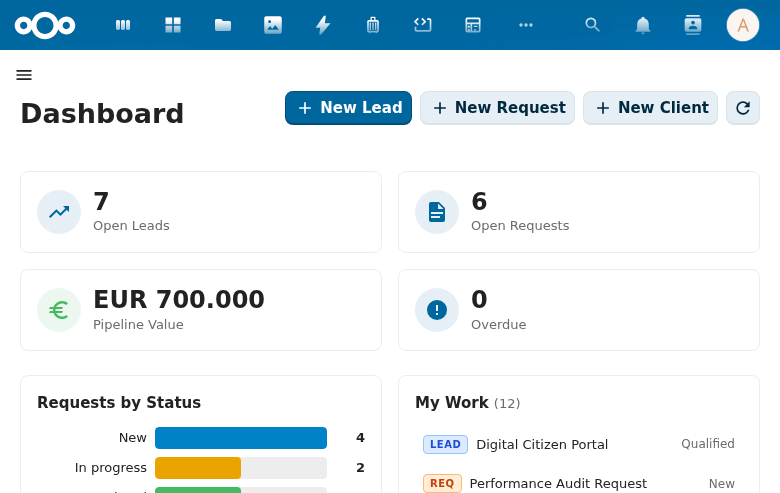
Statistics display card with icon, count, and optional breakdown. Used inside CnKpiGrid.
Wraps: NcLoadingIcon
Try it
Props
| Prop | Type | Default | Description |
|---|---|---|---|
title | String | '' | Card title |
count | Number | 0 | Main count value (formatted with toLocaleString) |
countLabel | String | 'objects' | Unit label below count |
breakdown | Object | null | Key-value pairs for breakdown display |
loading | Boolean | false | Loading state |
loadingLabel | String | 'Loading...' | |
emptyLabel | String | 'No items found' | |
error | String | Boolean | Object | null | The tile could not load its number. Anything truthy counts — pass the caught error itself, or true. Shows a dash and errorLabel instead of a count, tints the tile error, and suppresses the breakdown. Takes precedence over count, loading and emptyLabel. |
errorLabel | String | 'Unavailable' | Text shown in place of the count when error is set. |
icon | Component | null | MDI icon component |
iconSize | Number | 24 | Icon pixel size |
variant | String | 'default' | 'default', 'primary', 'success', 'warning', 'error' |
horizontal | Boolean | false | Deprecated since 2.25.0 — icon-left is the canonical card's own layout, so this prop no longer changes anything. Kept for existing callers. |
vertical | Boolean | false | Stack the icon above a centred number instead of placing it beside one. |
filled | Boolean | false | Draw the card's own grey box. Off by default: the block normally sits inside a wrapper that already draws a card, and a second box reads as a card inside a card. |
clickable | Boolean | false | Enable click interaction |
showZeroCount | Boolean | false | Display 0 as a count value instead of the empty label |
route | Object | null | Vue Router location object ({ name, path, query, ... }). When set, the card renders as a <router-link> and clickable styles are applied automatically. |
Error state
A tile that cannot load its number must not render one.
<CnStatsBlock
  :title="t('myapp', 'Overdue')"
  :count="count"
  :loading="loading"
  :error="error" />
error beats count, loading and emptyLabel, in that order of importance:
- over
count— a tile that fetched 42 and then failed to refresh must not keep presenting 42 as current. - over
loading— a failed load is finished, not in progress. - over
emptyLabel— "we could not read this" and "there is nothing here" mean opposite things to a reader, and used to look identical.
This exists because the alternative was observed in production: eleven tiles
across five apps answered a failed fetch with catch { count = 0 }. A
dashboard with a dead backend looked like a dashboard reporting genuinely empty
collections, and zero is a number a reader believes.
The tile tints itself — do not also pass variant="error". Two props for one
state means forgetting the second, and forgetting it is invisible: "Unavailable"
in the default colour reads as ordinary content. An explicit variant is
ignored while error is set.
An empty string is not an error: a caller clearing its message back to ''
is reporting recovery.
Events
| Event | Payload | Description |
|---|---|---|
click | event | Block clicked (only if clickable) |
Slots
| Slot | Bindings | Description |
|---|---|---|
#icon | — | Custom icon content |
#value | count (number), formatted (string) | Override the prominently-displayed value with a pre-formatted string (currency, percent, a — placeholder, …). count stays the raw number — this is presentation only. Defaults to the localized count. When provided, the value area always renders (even at count 0). |
Usage
<CnStatsBlock
  title="Active Contacts"
  :count="150"
  count-label="contacts"
  variant="primary"
  :breakdown="{ 'This week': 12, 'This month': 43 }"
  :icon="AccountGroupOutline"
  :clickable="true"
  @click="navigateToContacts" />
Formatted value via the #value slot
Keep count numeric and format the displayed value in the slot (currency, percent, a — placeholder):
<CnStatsBlock title="Total Pipeline Value" :count="totalValue" count-label="open opportunities">
  <template #value>{{ formatCurrency(totalValue) }}</template>
</CnStatsBlock>

<CnStatsBlock title="Win Rate" :count="winRate ?? 0" count-label="closed deals">
  <template #value>{{ winRate === null ? '—' : Math.round(winRate * 100) + '%' }}</template>
</CnStatsBlock>
Reference (auto-generated)
The tables below are generated from the SFC source via vue-docgen-cli. They reflect what's actually in CnStatsBlock.vue and update automatically whenever the component changes.
Props
| Name | Type | Required | Default | Description |
|---|---|---|---|---|
title | string | '' | Block title | |
count | number | 0 | The main count number to display prominently | |
countLabel | string | () => t('nextcloud-vue', 'objects') | Label displayed next to the count | |
breakdown | object | null | Detailed breakdown object (key-value pairs) | |
loading | boolean | false | Whether data is currently loading | |
loadingLabel | string | () => t('nextcloud-vue', 'Loading...') | Text shown while loading | |
emptyLabel | string | () => t('nextcloud-vue', 'No items found') | Text shown when count is 0 | |
error | union | null | The tile could not load its number. Anything truthy counts — pass the caught error itself, or just true. The tile then shows a dash and errorLabel INSTEAD of a count, and tints itself error. This takes precedence over count, loading and emptyLabel deliberately: a stale or defaulted number rendered during a failure is the exact thing this prop exists to stop. A dashboard showing 0 because the backend is down is worse than one showing nothing, because 0 is a number a reader will believe. | |
errorLabel | string | () => t('nextcloud-vue', 'Unavailable') | Text shown in place of the count when error is set. | |
icon | object|func | null | Icon component (e.g., imported MDI icon) | |
iconSize | number | 24 | Icon size in pixels | |
variant | string | 'default' | Color variant: 'default', 'primary', 'success', 'warning', 'error' | |
vertical | boolean | false | Stack the icon above a centred number instead of placing it beside one. The canonical KPI card is horizontal, so this is the opt-out; horizontal below is kept only for callers that already pass it. | |
horizontal | boolean | false | Lay the icon left of the content. No longer needed — this is the canonical card's own layout — and kept so existing callers that pass horizontal keep working. Pass vertical to stack instead. | |
filled | boolean | false | Draw the card's own grey box. Off by default: a stats block is normally rendered inside a wrapper that already draws a card, and a second box reads as a card inside a card. Turn it on for a block mounted with no wrapper around it. | |
clickable | boolean | false | Whether the card is clickable | |
showZeroCount | boolean | false | Whether to display 0 as a count value instead of the empty label | |
route | object | null | Vue Router location object for declarative navigation. When set, the card renders as a <router-link> and clickable styles are implied. { name: 'Cases', query: { status: 'open' } } { path: '/catalogi' } |
Events
| Name | Payload | Description |
|---|---|---|
click | — |
Slots
| Name | Bindings | Description |
|---|---|---|
icon | — | |
value | count, formatted | Override the prominently-displayed value — render a pre-formatted string (currency, percent, a "—" placeholder, …). count stays the raw number; this is presentation only. Defaults to the localized count. |