CnDataTable
Sortable data table with row selection, loading states, and schema-driven column generation. Supports dot notation for nested values (e.g., address.city).
Wraps: NcLoadingIcon, NcCheckboxRadioSwitch, CnCellRenderer
Try it
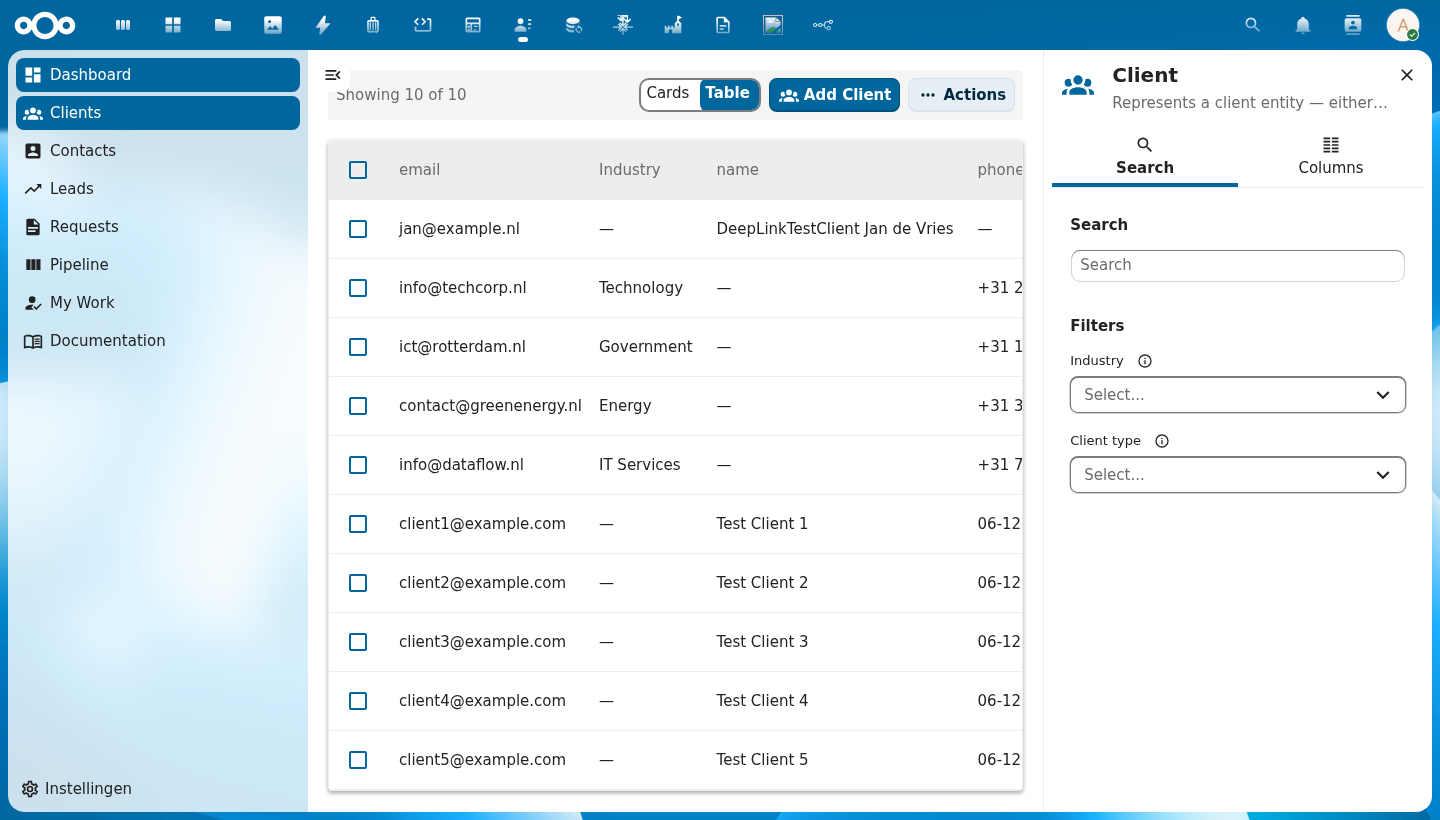
Anatomy
+--+------+----------↑---------+----------+----------+---------+----------------+
|  | sel. |  Column A ▲        | Column B | Column C | Column D| Actions header |
+--+------+--------------------+----------+----------+---------+----------------+
|☐ | 👤   | Alice van den Berg | Dept     | email@.. | Active  |⋮               |
|☐ | 👤   | Bob Jansen         | Dept     | email@.. | Pending |⋮               |
|☐ | 👤   | Carol Smit         | Dept     | email@.. | Active  |⋮               |
+--+------+--------------------+----------+----------+---------+----------------+
   ↑  ↑          ↑                                      ↑       ↑
   |  avatar   cell value                            badge    row actions
   checkbox                                          renderer
| Region | Description |
|---|---|
| Select-all checkbox | Checks/unchecks all rows on the current page |
| Column headers | A sortable header holds a sort button: a pale chevron while unsorted, a dark chevron pointing up (ascending) or down (descending) once sorted. Clicking cycles ascending, descending, no sort |
| Avatar / icon | Auto-generated from the row's name field via CnCellRenderer |
| Cell value | Type-aware rendering: email links, dates, booleans, status badges |
| Row actions | Per-row ⋮ menu — rendered via the #row-actions slot |
| Actions header | Slot above actions row — rendered via the #actions-header slot (only renders when row actions exist) |
| Loading overlay | Spinner centered over the table body while loading is true |
| Empty state | "No items found" message (or #empty slot) when rows array is empty |
Usage
<CnDataTable
  :schema="schema"
  :rows="objects"
  :sort-key="sortKey"
  :sort-order="sortOrder"
  :selectable="true"
  :selected-ids="selected"
  @sort="onSort"
  @select="onSelect"
  @row-click="onRowClick">
  <template #row-actions="{ row }">
    <CnRowActions :actions="rowActions" :row="row" @action="onAction" />
  </template>
</CnDataTable>
Props
| Prop | Type | Default | Description |
|---|---|---|---|
schema | Object | null | Schema object for auto-generating columns from its properties map |
columns | Array | [] | Column definitions: [{ key, label, sortable?, width?, align?, class?, cellClass?, grow?, formatter?, formatterOptions?, widget?, widgetProps?, aggregate?, firstOf? }]. align: 'right' (or 'end') puts the column, header included, at the end of its cells. firstOf (a list of fields, dotted paths allowed) shows the first that holds a value: a quote line's own name, else its linked product's name, else its description. formatter/widget/widgetProps resolve against the app's cnFormatters/cnCellWidgets registries (provided by CnAppRoot); formatterOptions is passed as the formatter's fourth argument (e.g. { currency: 'USD' } for the built-in currency formatter, or the { negative, zero, positive } phrases for conditionalPhrase) — see migrating-to-manifest → Column formatters / Column widgets. aggregate ({ register?, schema, op:"count", where }) renders the cell as a count of related OpenRegister objects (one _limit=0 request per row; op:"max" with field instead shows the highest field among them, one _limit=1 request sorted descending, through the column's formatter, and zeroLabel or — when there is none; @self.<path> in where interpolated per-row; … while loading, — on failure; aggregate.zeroLabel names a zero count, translated through cnTranslate; { endpoint, key, requiresApp? } reads the values from the host app instead, one GET of endpoint with keys[] (each visible row's key field) answered by { available, values: { key: value } }, a row it does not name counting 0; the column is not drawn while requiresApp is not installed or after the endpoint answers available: false) — see migrating-to-manifest → Aggregate columns. The #column-{key} scoped slot still overrides everything. |
rowIcon | String | Function | null | Optional leading icon at the start of every row. A static MDI icon name (PascalCase, e.g. 'FileDocumentOutline') applied to all rows, or (row) => iconName to vary it per row. Resolved through the shared CnIcon registry. Unset = no icon column. |
rowIconTone | String | 'primary' | The tone of the leading icon's tile in the board look: primary, teal or neutral (DqOrganisaties draws a teal tile). |
columnOverrides | Object | {} | Per-column overrides applied on top of schema-generated columns; keyed by column key |
excludeColumns | Array | [] | Column keys to hide when using schema auto-generation |
includeColumns | Array | null | Whitelist of column keys to show; all others hidden (takes precedence over excludeColumns) |
rows | Array | [] | Array of row data objects to display |
loading | Boolean | false | Shows a loading spinner overlay while true |
loadingText | String | 'Loading...' | Accessible label for the loading spinner |
sortKey | String | null | Currently sorted column key; controls the direction chevron. null means no column is actively sorted. |
sortOrder | String | 'asc' | Current sort direction — 'asc', 'desc', or null (no sort) |
sortKeys | Array | [] | Ordered multi-column ("shift+click") sort key list, [{ key, order }, …] (0–3 entries). When non-empty it takes precedence over sortKey/sortOrder; a single-key list is single-sort's behavior unchanged. Shift+click a sortable header to append/cycle a secondary or tertiary key. A numbered priority badge marks each sorted column only when two or more rendered, sortable columns are sorted; a key whose column is not rendered or not sortable (such as a _uuid tie-break) still sorts, but is not counted or numbered, and aria-sort goes to the first sort key whose column is rendered and sortable. |
selectable | Boolean | false | Enables the checkbox column for multi-row selection |
rowClickToView | Boolean | false | When true, a row-body click emits row-click (for navigation) even while selectable — selection then happens only via the checkbox column ("click row = open, tick box = select") |
selectedIds | Array | [] | Array of currently selected row IDs (controlled) |
rowKey | String | 'id' | Property name used as the unique row identifier |
emptyText | String | 'No items found' | Message shown when rows is empty and no #empty slot is provided |
lensReasonTexts | Object | null | null | App wording for an unavailable personal lens in self-fetch mode, keyed <lens>.<reason> or <reason>. When the response reports @self.lenses.<lens>.available: false (openregister#4514) the empty row says why instead of emptyText. |
rowClass | Function | null | Callback (row) => cssClass to add dynamic CSS classes to rows |
cellClass | Function | null | Callback (row, col) => cssClass to add dynamic CSS classes to individual data cells |
scrollable | Boolean | false | Enables horizontal scrolling for wide tables |
selectAllLabel | String | 'Select all rows' | Accessible name (aria-label) for the select-all checkbox in the header row, so screen readers announce a named control (WCAG 4.1.2) |
selectRowLabel | String | 'Select row' | Accessible name (aria-label) for each per-row select checkbox, so screen readers announce a named control (WCAG 4.1.2) |
showUnread | Boolean | true | Draw an unread record (@self.unread) in bold with the unread dot. Off, every row reads alike. CnIndexPage turns it off under the board look unless the page offers the Unread lens. |
rowTitle | String | 'link' | Board look only. link underlines the title column's title; plain draws it as 15px bold text without an underline over a 13px muted secondary line (the PqTickets board); text draws it as an ordinary 14px cell, weight 400, no underline (a log table such as DqZaakContact's contact moments). The row stays clickable. |
reorderable | Boolean | false | Lets the reader drag rows into another order. A drop emits row-move; the host stores the order. |
hideHeader | Boolean | false | Hide the column-header row (<thead>). Useful for compact dashboard list widgets that want a plain bordered-row list without column labels. |
pinnedCount | Number | 0 | How many data columns are pinned to the start of the table. They, and the selection and icon columns, stay in view when the table scrolls sideways. |
fixedLayout | Boolean | false | Switch to table-layout: fixed, making each column's width authoritative instead of a hint the browser may override from cell content. Opt in when content would otherwise dictate the layout: a long unbreakable value (a PHP FQCN, a UUID) widens its own column under the default auto layout and can paint past the cell box into its neighbour, while a column left unsized soaks up all remaining width. Cells break long words rather than overflowing. Columns with no width share what is left, so size every column when you want exact control — percentages summing to 100 are the easiest to reason about. |
fitWidth | Boolean | false | Fit the table to its container instead of growing past it. One column takes the room that is left and cuts its text with an ellipsis (the full value stays in the tooltip); every other column keeps its content on one line at its own width, so trailing columns stay visible in a narrow tile. The column that grows is the first with grow: true, else the one keyed title or name, else the first. CnWidgetObjectTable turns it on. |
rowIndicators | Array | [] | State indicators the page declares for its rows. Each entry is { id, field, equals?, in?, after?, before?, icon, text, tooltip? }: field is a dotted path on the row, the condition is equals, in, a date after or before a moment ("now" or an ISO date; a field without a readable date does not apply), or plain truthiness when none is given, icon is a CnIcon name, and text is the text alternative. An entry without text does not render, because an icon with no text is colour and shape alone (WCAG 2.2 SC 1.4.1). The page decides which indicators exist: a record cannot add one the page has not declared, and a page declaring none renders its rows exactly as before. |
framed | Boolean | false | Frame a table that sits straight in a card, as the Pipelinq POS boards draw it: a 1px frame with an 8px radius, 18px outer cell insets and a rule under the head and every row but the last. Board look only; the Nextcloud look ignores it. |
rowIndicatorCap | Number | 3 | How many declared indicators render on the row itself. The rest stay available from indicatorsFor(row).overflow, for the row menu. |
fillHeight | Boolean | false | Fill the parent's height (a flex-column card / widget content area) so an optional #footer is pushed to the bottom instead of floating under a short list; the footer stays pinned via its sticky rule when the list overflows. No-op outside a height-constrained parent — opt-in so ordinary in-flow tables are unaffected. |
Events
| Event | Payload | Description |
|---|---|---|
sort | { key, order } | Emitted when a sortable column header is clicked. Cycles through asc → desc → null. When the user clears the sort, both key and order are null. |
select | ids[] | Emitted when row selection changes; payload is the full updated selection array |
select-all | isSelectAll | Emitted when the select-all checkbox is toggled |
row-move | ({ row, from, to }) | Emitted when a row of a reorderable table is dropped on another place: the row and its old and new index. |
row-aux-click | (row, event) | Emitted on a row-body middle click (auxclick), under the same conditions as row-click, so a host can open the row in a new tab with openRowTarget. A middle click never reaches row-click, so a row-click listener that navigates keeps the current tab. |
row-click | (row, event) | Emitted when a data row is clicked (not the checkbox). The second argument is the native click event, so a host can open the row in a new tab on a ctrl/cmd/shift click with openRowTarget; listeners that take only the row keep working. A middle click emits row-aux-click instead. Only fires when selectable is false (or rowClickToView is set) — when selectable is true, a deliberate click anywhere on a row toggles its selection (emitting select) instead — a text-selection drag is not treated as a click. |
row-context-menu | { row, event } | Emitted when a data row is right-clicked. The native contextmenu event is prevented, except on a row link (rowClickRoute) when nothing listens to this event, so the browser's link menu stays available. Used by CnIndexPage with the useContextMenu composable to show a context menu at the cursor position. |
view-all | viewAllRoute | Emitted when the built-in "View all" footer control is activated (before the router push, when there is a router). Lets a host outside a vue-router context react to the button variant. |
Slots
| Slot | Scope | Description |
|---|---|---|
#column-{key} | { row, value } | Override the cell renderer for a specific column key |
#row-actions | { row } | Content for the last (actions) cell of each row — typically CnRowActions |
#row-detail | { row } | A full-width row under each data row, for what belongs to that row (CnObjectListWidget puts the row's child records here). Not draggable and not a drop target. |
#actions-header | - | Content for the header above the actions cell — typically a button |
#empty | — | Custom empty-state content shown when rows is empty |
Sorting and filtering from the header
With a schema, every column backed by a stored property sorts, also an
object-form column without a sortable flag ({ key: 'title', label: 'Title' }).
Set sortable: false to switch one off. A computed column (aggregate) or a
widget column without a property behind it does not sort, because the server
cannot order on it. Without a schema, only sortable: true sorts.
Set filterable to give every column that can filter a filter button in its
header. CnIndexPage does this by default; turn it off for a page with
config.headerFilters: false, or for one column with filterable: false.
| Column | Panel | Query parameters |
|---|---|---|
enum (with x-enum-labels), badge colour map | checkboxes | key[]=a&key[]=b |
| boolean | yes, no, any | key=true |
| number, date, date-time | from and to | key[gte], key[lte] (date-time up to T23:59:59) |
$ref or fkResolve | searchable list of the referenced objects | key[]=<uuid> |
| text | contains | key[like]=term |
A dotted key such as address.place filters the field inside an object
property when the schema describes it, under the same dotted name
(address.place[like]=zuid); OpenRegister filters such a path. A column can
name the stored field its filter works on with filterField. That field
decides the panel and the parameters, and it gives a computed column
(aggregate) a filter, as long as the server stores the field it names.
An aggregate column with aggregate.filterable: true filters through its
related rows with OpenRegister's related-row filter. Its where must link
one field to @self.id. A count offers Any and Yes: Yes keeps the rows that
have a related row matching the other where entries
(_related[case][requester][isFinalStatus]=false). The server cannot ask for
"none", so there is no No. A max over field offers a date range, matching
the rows that have a related row whose field falls in it
(_related[contactmoment][contact][startTime][gte]=…).
A text filter matches on contains, case-insensitive, through OpenRegister's
[like] operator: "acme" finds "Acme B.V.". The term goes out as typed, URL
encoded; OpenRegister escapes %, _ and \ itself, so the library adds no
wildcards. The header filter owns key[like] only. An exact key=value from
the facet sidebar or a fixed filter keeps its meaning, and the header neither
shows nor clears it.
The host owns the state. Pass the active-filter map as activeFilters
({ paramKey: values[] }, the map the facet sidebar writes) and handle
column-filter, which carries { key, params } with every parameter the
column owns; an empty list clears one. CnIndexPage merges it into its
filters, fetches once and writes it into the route query. A reference panel
searches /apps/openregister/api/objects/{register}/{schema}, with the
register from the column (widgetProps.register, x-external-register) or
the filterRegister prop.
A page that filters through other fields than the rows' own (a named
source's search fields) passes them as filterSchema; the header filters
then read that schema instead of schema.
A table that holds every row and has no host to keep the state (a settings
table read from an app endpoint) sets localHeaders. The table then sorts
and filters the rows it was given in the browser, from its own headers,
with the same panels and chips. sort and column-filter still emit, and
sortKey, sortKeys and activeFilters are not read. Only the first sort
key orders the rows.
The active header filters show as removable chips above the table. A host
that lists them itself sets filterChips to false; CnIndexPage does so in
the board look, where its Active line shows them.
Every sortable header shows a chevron after its label: pale while the
column is unsorted, dark and pointing in the sort direction once it is
sorted. The label and chevron are one real button named by the column label,
and the header carries aria-sort, so a screen reader hears the column name
and its sort state. Enter sorts, Shift+Enter adds the column as a secondary
sort key.
A filterable header shows a 14px funnel right after the chevron, in the
muted text colour while no filter is set. It is a separate button, labelled
Filter by {column} (Dutch: Filteren op {column}), so opening the filter
never sorts the column. Active filters show as the funnel in the primary
colour with a dot, and as removable chips above the table. The panel is a
labelled dialog of native inputs; Escape closes it and focus returns to the
filter button.
Reference (auto-generated)
The tables below are generated from the SFC source via vue-docgen-cli. They reflect what's actually in CnDataTable.vue and update automatically whenever the component changes.
OpenRegister reliance
heavy: this component cannot work without OpenRegister. 4 direct references, 18 files reached through imports.
Through: CnActionDialog, CnAssignDialog, CnBulkJobProgress, CnCellRenderer, CnFkResolveCell, CnIndexPage.
See the reliance overview for the filterable list.
Props
| Name | Type | Required | Default | Description |
|---|---|---|---|---|
columns | Array<{key: string, label: string, description: string, sortable: boolean, width: string, align: ('left'|'right'|'end'), class: string, cellClass: string, link: boolean, secondary: (string|((row: object) => string)), secondaryLabels: object, emptyValue: unknown}|string> | [] | Column definitions (manual mode). Not required when schema is provided. Each entry may be a full column object OR a bare string key; bare strings are normalised to { key, label } by effectiveColumns so manifest-driven pages that pass config.columns as a string array work without extra mapping. description renders as the header cell's tooltip and marks the label with a dotted underline, so a column whose meaning is not obvious from its name (a maturity level, a computed score, a domain term) can explain itself where the reader is looking. columnsFromSchema fills it from the JSON Schema property description automatically, so schema-driven tables get it for free. secondary draws a second, muted line under the cell's value: a field key ("number"), a template with {field} placeholders ("{number} · {requester}", dotted paths allowed; {startAt|weekday} formats through fillTemplate), or a function of the row. Empty fields leave their placeholder blank; a line that resolves to nothing is not drawn. secondaryLabels names a field's values on that line, { field: { value: label, '*': label } } (i18n keys; '*' for any other value). A list field on that line (surfaces: ['site', 'portal']) names each value through secondaryLabels and reads as a list in the page's language ("website en Mijn Zuiddrecht"). valueWhen ([{ when, value }], when a row condition or a list of them, as rowClass takes) names what the cell holds by the row's fields: the first rule that holds gives the value, which the cell then draws as any value (a badge maps it through colorMap and its labels). No rule holding leaves the stored value. secondary may also list templates: the first whose fields all hold a value is drawn. secondaryRefs ({ alias: { field, register, schema, counts } }) reads the records a row points at, once per id, so the line can name them ({segment.name}); counts adds, per referenced record, a count aggregate of what points at it. firstOf (a list of fields, dotted paths allowed) shows the first that holds a value, instead of the column's key. link: true makes that column the one that names the row: it carries the row link and the title look. Without it the first column does. align: 'right' (or 'end') puts the column at the end of its cells, header included, as class: 'cn-table-col--end' does. emptyValueBy ({ field, values }) names what an empty cell holds by another field of the row, translated; it goes before emptyValue. emptyValue is what a row without a value holds in that column, so a badge column draws a pill on every row. emptyLabel is the words an empty cell reads, translated, as plain text past the format. | |
rowIcon | string | ((row: object) => string) | {field: string, icons: object, tones?: object, icon?: string} | null | null | Optional leading icon shown at the start of every row. Either a static MDI icon name (PascalCase, e.g. 'FileDocumentOutline') applied to all rows, or a function (row) => iconName to vary it per row. The icon is resolved through the shared CnIcon registry. Unset = no icon column. An object { field, icons, tones?, icon? } picks the icon by a field of the row (icons[value], else icon) and its tile tone by the same value (tones[value], else rowIconTone), as a manifest can declare. | |
rowIconTone | string | 'primary' | The tone of the leading icon's tile in the board look: primary (default), teal or neutral (DqOrganisaties draws a teal tile). | |
rowIndicators | union | [] | State indicators a page declares for its rows. Each entry is { id, field, equals?, in?, icon, text, tooltip? }: field is a dotted path on the row, the condition is equals, in, or plain truthiness when neither is given, icon is a CnIcon name, and text is the text alternative. An entry without text does not render, because an icon with no text is colour and shape alone. The page declares which indicators exist. A record cannot add one the page has not declared, however it is shaped. A page declaring none renders its rows exactly as before. | |
rowIndicatorCap | number | DEFAULT_ROW_INDICATOR_CAP | How many declared indicators render on the row itself. The rest are available from indicatorsFor(row).overflow for the row menu. | |
schema | object | null | Schema object with properties field (schema-driven mode). When provided, columns are auto-generated from schema properties. | |
columnOverrides | object | \{\} | Per-column overrides when using schema mode: { key: { width, label, sortable, ... } } | |
excludeColumns | array | [] | Column keys to exclude when using schema mode | |
includeColumns | array | null | Column keys to include when using schema mode (whitelist) | |
rows | array | [] | Row data array. Each row should have a unique identifier (see rowKey). | |
loading | boolean | false | Whether data is loading (shows loading spinner) | |
sortKey | string | null | Current sort column key | |
sortOrder | string | 'asc' | Current sort order: 'asc', 'desc', or null (no sort) | |
sortKeys | Array<{key: string, order: 'asc'|'desc'}> | [] | Ordered multi-column sort state: [{ key, order }, ...] (priority order, 0 to 3 entries). Optional — when empty (the default), the table falls back to the legacy sortKey/sortOrder props, so single-sort hosts are completely unaffected. Shift+click a sortable header to append/cycle a secondary or tertiary key (see src/utils/multiColumnSort.js). | |
selectable | boolean | false | Whether rows can be selected with checkboxes | |
selectedIds | array | [] | Array of currently selected row IDs | |
rowKey | string | 'id' | Property name used as unique row identifier | |
emptyText | string | () => t('nextcloud-vue', 'No items found') | Text shown when there are no rows | |
lensReasonTexts | {[key: string]: string}|null | null | App wording for an unavailable personal lens in self-fetch mode, keyed <lens>.<reason> (recent.audit-trail-disabled) or <reason>. Without it the library's object-neutral text is shown when the response reports @self.lenses.<lens>.available: false. | |
rowClass | func | null | Function returning CSS class(es) for a row: (row) => string|object | |
cellClass | func | null | Function returning CSS class(es) for a data cell: (row, col) => string|object | |
scrollable | boolean | false | Whether to constrain table height and make it scrollable | |
loadingText | string | () => t('nextcloud-vue', 'Loading…') | Text shown while loading | |
selectAllLabel | string | () => t('nextcloud-vue', 'Select all rows') | Accessible name for the select-all checkbox in the header row. Used as the checkbox's aria-label so screen readers announce a named control (WCAG 4.1.2). Defaults to the lib's translation of "Select all rows". | |
selectRowLabel | string | () => t('nextcloud-vue', 'Select row') | Accessible name for a per-row select checkbox. Used as the checkbox's aria-label so screen readers announce a named control (WCAG 4.1.2). Defaults to the lib's translation of "Select row". | |
title | string | '' | Optional card title rendered in a header above the table. When set, the table reads as a self-contained card (the container's own border/radius is the card chrome). Folded in from the retired CnTableWidget. | |
showUnread | boolean | true | Draw an unread record (@self.unread) in bold with the unread dot. Off, every row reads alike whatever its read state. | |
rowTitle | string | 'link' | How the board look draws the title column: link (the default) is the 15px weight 600 underlined title of the DqZaken board; plain is the 15px bold title without an underline and a 13px muted secondary line, as the PqTickets and OcPublicaties boards draw it; text is an ordinary cell, for a log table whose first column is a date (DqZaakContact); strong is the cell's own size at weight 600 in the main ink without an underline, the name column of a card's list (DqZaaktypeStatussen). The row stays clickable either way. The Nextcloud look ignores it. | |
borderless | boolean | false | Drop the container's card chrome (border, radius, shadow) so the table sits flush inside a parent that already provides a card (e.g. a CnWidgetWrapper dashboard slot). Folded in from CnTableWidget. | |
framed | boolean | false | Frame a table that sits straight in a card, as the Pipelinq POS boards draw it (PqKassa "Aankoopgeschiedenis"): a 1px frame with an 8px radius, 18px outer cell insets and a rule under the head and every row but the last. Board look only; the Nextcloud look ignores it. | |
fillHeight | boolean | false | Fill the height of the parent (a flex-column card / widget content area) so the optional #footer is pushed to the bottom instead of floating directly under a short list. When the list is long enough to overflow, the footer stays pinned via its sticky rule. No-op outside a height-constrained parent. Opt-in so ordinary in-flow tables are unaffected. | |
pinnedCount | number | 0 | How many data columns are pinned to the start of the table. They (and the selection and icon columns, which are pinned whenever any column is) stay in view when the table scrolls sideways. | |
reorderable | boolean | false | Let the reader drag rows into another order. A drop emits row-move with the row and its old and new index; the host stores the order. | |
hideHeader | boolean | false | Hide the column-header row (<thead>). Useful for compact dashboard list widgets that want a plain bordered-row list without column labels. | |
fixedLayout | boolean | false | Switch the table to table-layout: fixed, making each column's width authoritative instead of a hint the browser may override. Opt in when a column's content would otherwise dictate the layout — a long unbreakable value (a PHP FQCN, a UUID) widens its column under the default auto layout and can render past the cell box into its neighbour, while any column left unsized soaks up all remaining width. Cells also break long words rather than overflowing. Columns with no width share whatever space is left, so size every column when you want exact control. | |
fitWidth | boolean | false | Fit the table to its container instead of letting it grow past it. One column takes the room that is left and cuts its text with an ellipsis (the full value stays in the tooltip); every other column keeps its content on one line at its own width, so trailing columns such as a date stay visible in a narrow tile. The column that grows is the first with grow: true, else the one keyed title or name, else the first column. CnWidgetObjectTable turns this on. | |
limit | number | 0 | Max number of rows to display. When the total exceeds it, only the first limit render and the "View all" footer appears (with viewAllRoute). 0 = show all. Folded in from CnTableWidget. | |
pageSize | number | 0 | Rows per page. Above 0 the table shows one page of its rows and the board's pager under them ("4 of 7", page buttons, Next) once there is more than one page. Pages the rows the table holds; 0 (the default) shows them all, or the first limit. | |
viewAllRoute | union | null | vue-router route object for the "View all" footer link. The footer only shows when set AND the rows are a limit-ed subset. Folded in from CnTableWidget. | |
viewAllLabel | string | () => t('nextcloud-vue', 'View all') | Pre-translated "View all" footer label. | |
register | union | null | Self-fetch mode (folded from CnTableWidget): the OpenRegister register id/slug. When register + schemaId are set and no rows are passed, the table fetches /apps/openregister/api/objects/{register}/{schemaId}. | |
schemaId | union | null | Self-fetch mode (folded from CnTableWidget): the OpenRegister schema id used together with register. (Distinct from the schema prop, which is a JSON Schema object for column generation.) | |
fetchParams | union | null | Extra query parameters sent with the self-fetch request (register + schemaId mode) — e.g. a resolved filter map, _order[field] ordering, or _limit. Changing it re-triggers the self-fetch, so a host widget (CnWidgetObjectTable's declarative source) can drive filtering and ordering without re-implementing the fetch. Ignored when external rows are supplied. | |
rowClickRoute | ((row: object) => object)|null | null | Convenience navigation (folded from CnTableWidget): a function that receives a row and returns the vue-router route it opens. When set, each row renders as a real link to that route, stretched over the row: a click navigates there (the row-click event still fires), and a ctrl/cmd/shift or middle click opens it in a new tab. A table whose row click selects (selectable without rowClickToView) gets no link. | |
rowClickToView | boolean | false | When true, a row-body click emits row-click (for navigation) even while selectable — selection then happens only via the checkbox column. Lets "click row = open, tick box = select" coexist. Default false keeps the legacy behaviour (selectable rows select on body click). | |
filterable | boolean | false | Show a filter button in every header whose column can filter (see columnFilterDef): enum, boolean, text, number, date and reference columns backed by a schema property. A column opts out with filterable: false. Applying a filter emits column-filter; the host owns the filter state and passes it back as activeFilters. | |
filterSchema | object | null | The schema the header filters read instead of schema: a page that filters through other fields than the rows' own (a named source's search fields) hands them here. Null: the header filters read schema. | |
filterChips | boolean | true | Draw the active header filters as removable chips above the table. A host that lists them itself (the index page's board Active line) turns this off, so a filter is not shown twice. | |
activeFilters | object | \{\} | The active filter map, { paramKey: values[] }: the same map the facet sidebar writes, so a header filter and a sidebar filter on one field show the same state. | |
filterRegister | string | '' | Register slug a reference column's filter searches in when the column names none. | |
localHeaders | boolean | false | Sort and filter the rows the table holds from its own headers, in the browser: for a table that holds every row (a settings table read from an app endpoint) and has no host keeping the state. sort and column-filter still emit; sortKey, sortKeys and activeFilters are not read. |
Events
| Name | Payload | Description |
|---|---|---|
row-click | undefined | Emitted on a row-body click for navigation. Fires when selectable is false, OR when rowClickToView is set (selection then happens via the checkbox column). Payload: (row, event) — the clicked row object and the native click event, so a host can open the row in a new tab on a ctrl/cmd/shift click (see openRowTarget). A middle click emits row-aux-click instead. |
row-aux-click | undefined | Emitted on a row-body middle click, under the same conditions as row-click, so a host can open the row in a new tab (see openRowTarget). Payload: (row, event) — the clicked row object and the native auxclick event. |
row-context-menu | — | Emitted on a row right-click (contextmenu) for hosts that render a context menu. |
row-move | — | A row was dragged to another place (reorderable). Payload: { row, from, to }, the dragged row and its old and new index. |
select | — | Emitted when row selection changes. Payload: array of selected IDs. |
select-all | — | Emitted when select-all checkbox is toggled. |
sort | — | Emitted when a sortable column header is clicked (plain click) or shift-clicked (multi-sort). |
view-all | — | Emitted when the built-in "View all" footer control is activated. Payload: the viewAllRoute object. |
column-filter | — | A header filter was applied or cleared. |
Slots
| Name | Bindings | Description |
|---|---|---|
actions-header | — | Header cell content above the row-actions column (blank by default). |
empty | — | Empty-state content shown when there are no rows (defaults to emptyText, or why an unavailable personal lens is empty). |
'column-' + col.key | name, row, value | Per-column cell override (#column-<key>), scoped with { row, value }. Wins over CnCellRenderer. |
row-actions | row | Per-row actions menu (e.g. a CnRowActions), scoped with { row }. Supplying it adds the trailing actions column. |
row-detail | row | Content under a data row, across the full width (e.g. that row's child records), scoped with { row }. |
footer | total, shown | Custom footer content, scoped with { total, shown } (defaults to the built-in "View all" link). |
Card / widget mode (folded from CnTableWidget)
CnDataTable is now the single table component — the deprecated CnTableWidget's
features are folded in here as opt-in props (bare-table usage is unchanged):
title— render a card header (title + total-count badge) above the table.borderless— drop the container's card chrome so the table sits flush inside a parent card (e.g. aCnWidgetWrapperdashboard slot).limit— show only the first N rows; withviewAllRoutea "View all" footer appears.pageSize— rows per page: one page of the rows the table holds, with the board's pager under them ("4 of 7", the page buttons, Next) once there is more than one page (DqCatalogus). 0 (the default) shows every row, or the firstlimit.viewAllRoute/viewAllLabel— the footer control's route and label. It renders as a real<a :href>when the router resolves the route, and as a<button type="button">(emittingview-all) otherwise, so it always has a link or button role and is keyboard reachable.register+schemaId— self-fetch rows from OpenRegister when norowsare passed.fetchParams— extra query params for the self-fetch (a resolved filter map,_order[field]ordering,_limit); changing it re-triggers the fetch. Used byCnWidgetObjectTable's declarativesource.rowClickRoute— a function mapping a row to a vue-router route. Each such row renders a real<a href>in its first cell, stretched over the row, so hovering shows the URL, a plain or alt click routes in place, a ctrl/cmd/shift or middle click opens a new tab, and the row is reachable with Tab. The link is named by the first cell's text ("Open row" when that is empty or not plain text). There is no link on aselectabletable withoutrowClickToView, where a row click selects.CnWidgetObjectTablerows inherit it. Trade-offs: cell text cannot be selected by dragging on a linked row, and a right-click on it shows the browser's link menu only when no host listens torow-context-menu.hideHeader— drop the column-label row for a compact list widget.#footerslot ({ total, shown }) — supply a custom footer link (e.g. "+ New" or an always-shown "View all") with its own handler; works outside a vue-router context.
The column that names the row (columns[].link)
The first column names the row: it carries the row link, the title look and the unread, lock and indicator marks. link: true on another column moves all of that there, for a table that leads with something else (the DqTeamwachtrij board puts the waiting time first and links the case title in the second column).
"columns": [{ "key": "waiting", "label": "Wacht" }, { "key": "title", "label": "Zaak", "link": true }]
A second line in a cell (columns[].secondary)
secondary on a column draws a muted second line under the cell's value: a field key ("number"), a template with {field} placeholders ("{number} · {requester.name}", dotted paths allowed), or a function of the row. A line that resolves to nothing is not drawn.
{ "key": "title", "label": "Case", "secondary": "{number} · {requester.name}" }
secondaryLabels names a field's values on that line in words, { field: { value: label, "*": label } }; the labels are i18n keys and "*" names any other value. A case type list reads "Meegeleverd · Woo" for a type the app shipped and "Eigen zaaktype · ..." for one an organisation made:
{ "key": "title", "label": "Case type", "secondary": "{@self.owner} · {subject}", "secondaryLabels": { "@self.owner": { "__system__": "Shipped", "*": "Own case type" } } }
A placeholder can carry a format, the same ones a widget row template takes: {startAt|date} reads "5 okt", {startAt|weekday} reads "ma 5 okt", {startAt|weekday:today} reads "Vandaag, ma 5 okt" on today's date, {startAt|time} reads "08:45", and {amount|currency:EUR} writes an amount. An agenda column reads "Intake" over "Vandaag, ma 5 okt, 08:45":
{ "key": "subject", "label": "Appointment", "secondary": "{startAt|weekday:today}, {startAt|time}" }
Theme hooks: --cn-table-secondary-size (0.9em), --cn-table-secondary-color.
Show one field, sort on another (columns[].valueField)
A column sorts and filters on its key. With valueField its cell shows another row field instead, with that field's schema property (labels, enum, format), while the header keeps sorting on the key. A priority stored as a word sorts as high, low, normal, urgent; sorting on the stored order and showing the word reads right:
{ "key": "priorityOrder", "valueField": "priority", "label": "Priority", "widget": "badge" }
A system date as a column (@self.created)
A column may name one of the object's system dates in OpenRegister's @self block as its key: @self.created, @self.updated, @self.published or @self.depublished. The cell reads the value from @self and renders it as a date-time, unless the column declares its own type or format.
{ "key": "@self.created", "label": "Created" }
Pill colours on a column (columns[].colorMap)
An enum column renders each value as a status pill. colorMap on the column maps the raw value to a pill tone, so the manifest colours the pills without touching the schema. The map is keyed on the raw enum value, not on the translated label, and it wins over the schema property's own colorMap or x-color-map. A value the map does not name, and a column without a map, keep the default grey pill.
{ "key": "status", "label": "Status", "colorMap": { "new": "primary", "in_progress": "purple", "awaiting_customer": "warning", "resolved": "success", "converted": "teal" } }
The tones are default, primary, success, warning, error, info, purple and teal. See CnStatusBadge.
Board look
Under the board look the table container is a white card (radius 12, no shadow), header cells are weight 600 on the hover ground, the first data cell is the title column (a 15px link with the secondary line under it) and the last column is headed by a visually hidden "Actions".